2.4 · Proof of concept · Command
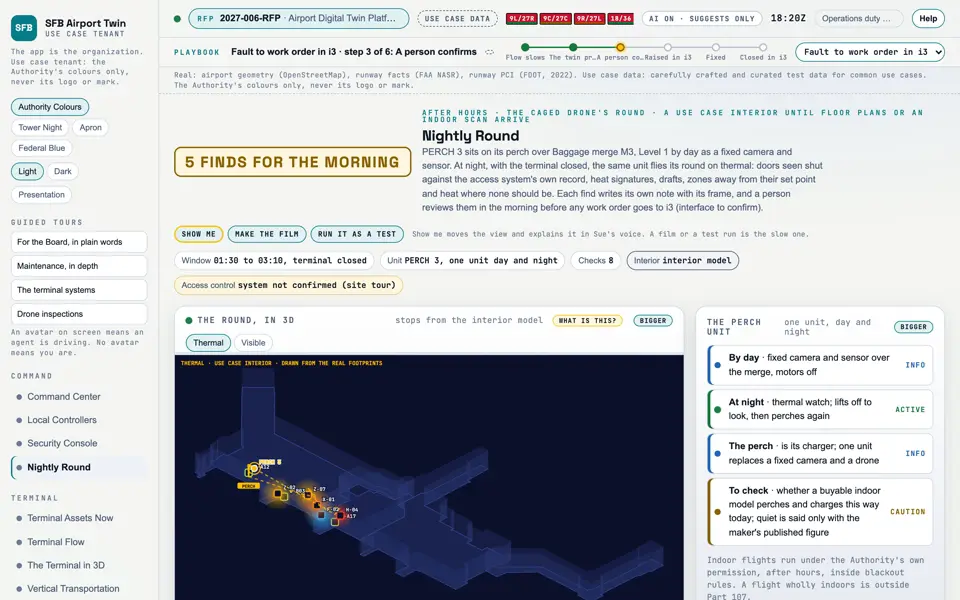
Nightly Round Simulated After hours, the perched caged drone flies its round on thermal and fills its checklist.
Picture: Headless capture of poc/index.html?v=round&m=light, as the proof of concept renders it, 1400 by 875 at 2x scale.
Screen · Proof of concept · Command
After hours, the perched caged drone flies its round on thermal and fills its checklist.
Sources Interchange Twin Screens Plan
Kind Screen
Status not linked
Airport layer Screens: the POC story and the spines
Airport area not linked
System not linked
Sensor type not linked Open the screen · Open the detail
Level 2 of 3 This component, complete on its own. Its files, sources and tests are the detail below. Open the detail
Open this screen in the proof of concept
Narration line It shows the round over an illustrative interior drawn from the real footprints, in thermal or visible view.
Source: poc/bearings/round.json, beat "What it shows"
Group Command
Status as the app labels it Simulated
Basis The drone flights are simulated. The screen runs. Data: carefully crafted and curated test data for common use cases. What the screen must do (4) Fly a set route after hours over the terminal interior, illustrative until floor plans or an indoor scan arrive (REQ-SFB-016) Compare each door seen shut with the access control system's own record and flag a disagreement Rank heat signatures, drafts, zones away from their set point and heat out of place, each with its evidence frame (REQ-SFB-017, REQ-SFB-037) Leave each find as a note for a person's morning review before any work request (REQ-SFB-037) Requirement identifiers (3) REQ-SFB-016, REQ-SFB-017, REQ-SFB-037
Previous Security ConsoleNext Terminal Assets Now